Loading project Things
README.mdView source
RepPanel
A simple user interface for Duet/RepRap based 3D printers. Optimized for 3.5" touch panels controlled via SPI & I²C using an ESP32.
Supports wireless connection or wired via UART/PanelDue port.
An open source alternative to the PanelDue.
- Cheap (~18€ display + 7€ ESP32)
- Beautifully dark
- Compact and easy to use
- Support for most operations required to set up a 3D print
- Wireless connection - portable with power bar
- PanelDue-port/UART connection

Features
Since RepPanel boots in ~1 second you can start setting up your printer in no time and with no additional hardware. No need to get the laptop and log in to DuetWebControl. No need to get mad over using WebControl in your smartphones browser.
- Start, Stop, Pause & Resume print jobs based of Duets SD card
- Simulate print jobs
- Delete print jobs
- Run macros (no dictionary support yet)
- Home X, Y, Z or All axis
- Set extruder fan speed
- Load/Unload filament per tool
- Set bed temperatures
- Set tool temperatures
- Monitor temperatures
- Monitor print job:
- Percent complete
- Duration
- Elapsed time (based of simulation, otherwise from file)
- Job name
- Current layer
- Run manual and automated bed leveling
- Automatic reconnection
- Low latency
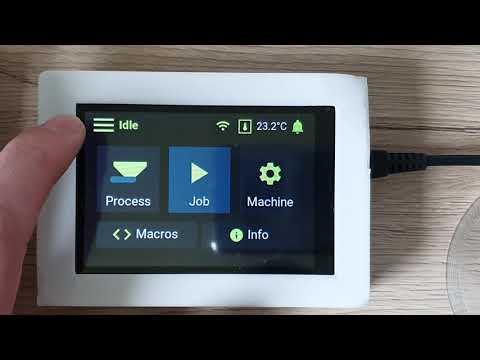
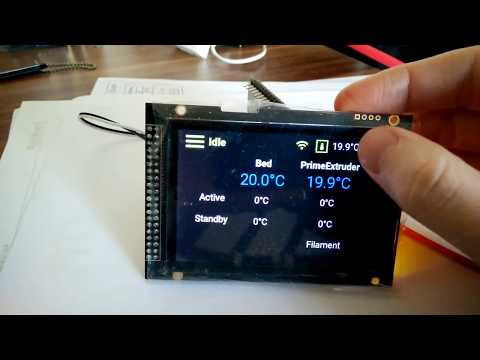
What this project is not
A full replacement for the DuetWebControl interface.
Supported Hardware/Software
The RepPanel project is based on the LVGL port for the ESP32. In theory this means all displays and touch controllers supported by the lv_port_esp32 project are also supported by RepPanel.
Tested Hardware
Beware: There are numerous version of the ER-TFT035-6. You must choose the one with the SPI interface. Do not get the arduino shield version (no SPI config). The version with the screen breakout board is sufficient.
Other display modules with a resolution of 480x320 should also work as long as they are supported by lv_port_esp32
As of now RepPanel is optimized for 3.5" displays with a resolution of 480x320 pixels. The display is connected via SPI.
Tested Firmware
- Duet2 WiFi running RepRap Firmware v3.0 and corresponding Duet2WebControl
- Duet2 WiFi running RepRap Firmware v3.1 and corresponding Duet2WebControl
Installation
Use ready made images or compile yourself.
Compile yourself
Set up ESP-IDF
Follow instructions on offical Espressif site.
ESP-IDF v4.0 is officially supported.
Clone Project
git clone --recurse-submodules https://github.com/seeul8er/RepPanel_ESP32
LVGL v7 is not supported. Last tested release of lv_port_esp32 is commit c1f43bfb090df293059ab52baabbdbdd8df00712
Configure Project
Update lv_conf.h
Copy file content of main/lv_conf_back.h over to externals/lv_port_esp32/components/lvgl/lv_conf.h.
Or simply add:
- Set
LV_USE_USER_DATA 1 - Add
#define LV_USE_THEME_REP_PANEL_DARK 1 - Set
LV_INDEV_DEF_DRAG_THROW 85to decrease DMA usage and increase stability CONFIG_LVGL_FONT_ROBOTO16&CONFIG_LVGL_FONT_ROBOTO22must be activated- Add
#define LV_FONT_CUSTOM_DECLARE  LV_FONT_DECLARE(reppanel_font_roboto_bold_16) \
                                       LV_FONT_DECLARE(reppanel_font_roboto_bold_18) \
                                       LV_FONT_DECLARE(reppanel_font_roboto_bold_24) \
                                       LV_FONT_DECLARE(reppanel_font_roboto_regular_26) \
                                       LV_FONT_DECLARE(reppanel_font_roboto_light_26) \
                                       LV_FONT_DECLARE(reppanel_font_roboto_thin_numeric_160) \
                                       LV_FONT_DECLARE(reppanel_font_roboto_regular_percent_40)
From its root run:
idf.py menuconfig
See LVGL port for the ESP32 for further and more detailed instructions.
Compile & Flash
idf.py build
idf.py -p (YOUR PORT) flash
See LVGL port for the ESP32 for further and more detailed instructions.
Use ready made images
Ready made images are only available for selected hardware combinations! Please compile the project by yourself in case you use different hardware or want a different pin connection layout
Check out releases for compiled binaries.
Wiring ER-TFTM035-6 to the ESP32 DevKit
Beware: The available development boards have different pin configurations. Some have GND & 3.3V at the bottom. Others at the top.
Pin configuration of ready made images:
| **Pin Number ESP32 ** | Pin Number ER-TFTM035-6 | Function | Description |
|---|---|---|---|
| VCC 3.3V | 2 | Power supply | Match TFT voltage with ESP32 pin |
| GND | 1 | GND | Ground |
| GPIO 13 | 27 | MOSI | Data line to TFT |
| GPIO 14 | 24 | SCL | SPI CLK for TFT |
| GPIO 15 | 23 | Slave Select | SPI |
| GPIO 22 | 30 | SCL | I²C - touch |
| GPIO 21 | 31 | SDA | I²C - touch |
| GPIO 4 | 21 | Reset | TFT related |
| GPIO 2 | 25 | Data | TFT related |
| GPIO 27 | 29 | Backlight | Turn on/off TFT backlight |
| GPIO 17 | - | UART TX | Connect to RX PanelDue port |
| GPIO 16 | - | UART RX | Connect to TX PanelDue port |
Screenshots


For Developers
Check out the simulator project. Simulates the RepPanel GUI on Desktop computers for more efficient testing and implementation.
Known Limitations
- Multiple tools supported but not tested
- Auto swap from UART to WiFi connection might take up to 10s
- Entries per directory listing limited to 16 for jobs and macros
- Directory path limited to 128 characters
- Filament listing (all filament names separated by one character) limited to 1014
- Can not list all files within a directory in case DuetWebControl API requires multiple requests per listing
- Workaround: Delete files to reduce file count to make all files fit within one response
Known Bugs
- Messages printed by G-Code commands can not be "clicked away"
- Irregular freezes of the screen with RRF 3.1