Loading project Things
README.mdView source



ℹ️ A comprehensive GitBook user manual is currently being created. This README will soon be complemented by a full online documentation! 💡 A scientific article will soon be published detailing our research and EEG classification methods underlying Prometheus BCI.
🧠⚡ Prometheus BCI
Overview
Prometheus BCI is an advanced platform for the collection and analysis of multimodal data, designed to support applications in neuroscience, biofeedback, and brain-computer interfaces (BCIs), based on Timeflux. It processes data from various devices and sensors, converting raw input into actionable metrics and insights for cognitive and physiological analysis.
🌟 A Tribute to Nathalie and Pierre
Prometheus BCI’s first interface was born from a unique challenge: enabling Nathalie Labrégère to interact with an exoskeleton arm and carry the Olympic flame on May 9, 2024, in Marseille.
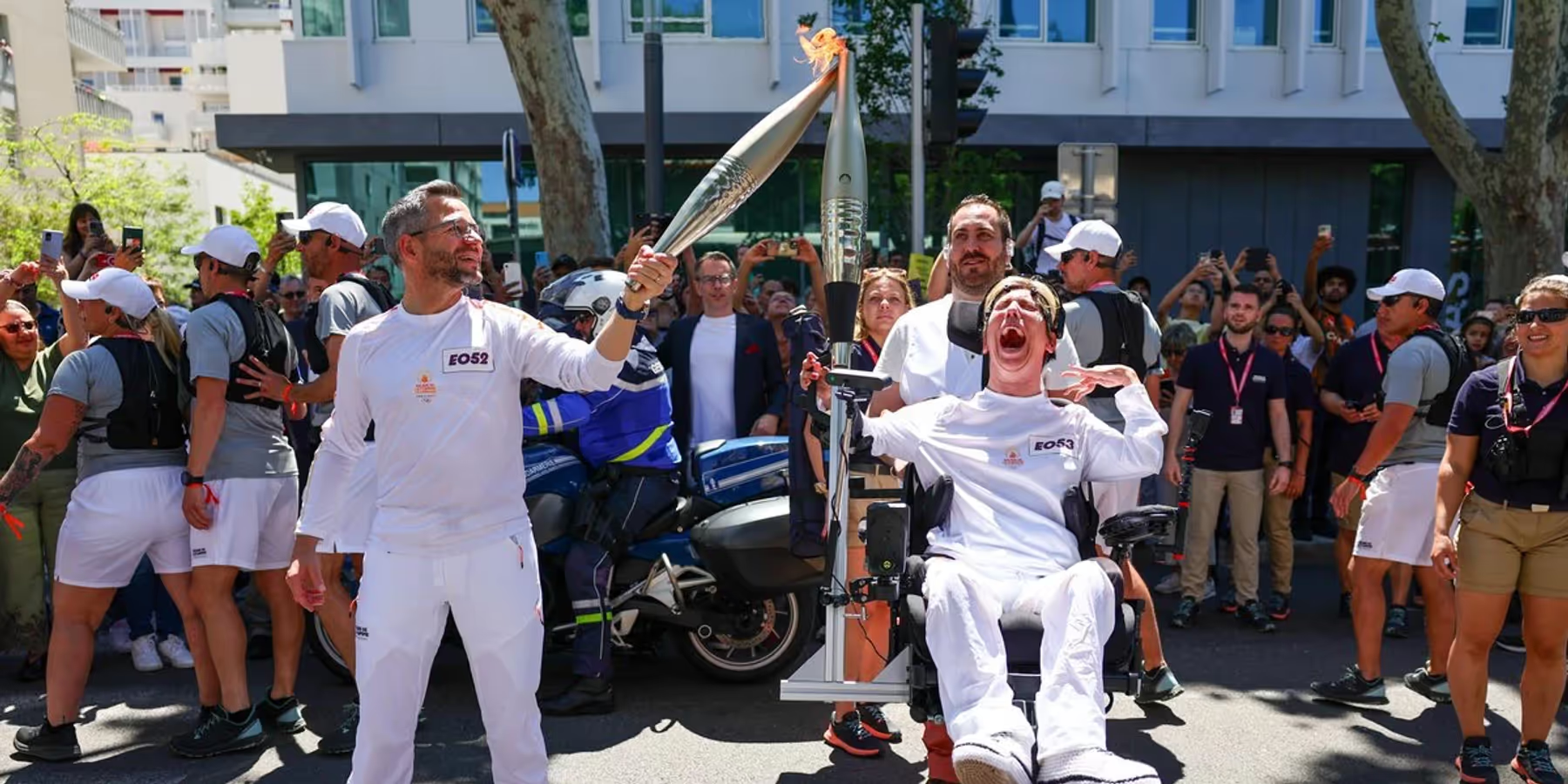
Due to severe motor and cerebral disabilities, Nathalie could not use motor imagery commands; her only means of interacting with the world is through her facial expressions. Thanks to her determination, Prometheus BCI allowed her to control the exoskeleton arm using just those subtle facial movements.
A few weeks later, on July 24, 2024, Pierre Landerretche — also living with motor disabilities — carried the Olympic flame in Versailles, on the eve of the opening ceremony.
Their journeys are a tribute to the spirit of inclusion, resilience, and innovation.
Prometheus BCI exists because of pioneers like Nathalie and Pierre, whose courage and stories inspire us to push the boundaries of assistive neurotechnology — for everyone.
This project is made possible thanks to the support of Allianz Trade, whose commitment to innovation and inclusion helps turn advanced AI and neurotechnology into real-world solutions for people with disabilities.
👋 Contributing
Prometheus BCI is open source with a purpose: to be improved, forked, and reimagined by the community. We want this platform to evolve through collective intelligence — whether you’re passionate about neuroscience, creative signal processing, innovative machine learning, UX design, or simply exploring new ways to use multimodal data.
Feel free to open an issue or submit a pull request.
Any contribution — from advanced Riemannian geometry, CSP or deep learning, to interface tweaks or documentation — will help make Prometheus BCI better for all.
To get started, simply fork the repository, create a feature branch, and propose your changes.
If you are a researcher and want to add or benchmark new classification pipelines, please document your methods clearly (and share references if relevant).
Let’s advance open science and BCI innovation together! 🚀
🏗️ Key Features
-
🧲 Data Collection
EEG, PPG, and facial expressions — connect Emotiv, OpenBCI, smartwatches, or cameras. -
🌀 Signal Processing
Filtering, feature extraction (EEG bands, HRV), state computation (stress, attention, etc). -
📊 Metrics & Experiments
Multimodal metrics, N-back tasks, mental command classification (Riemannian geometry, CSP and non linear features soon). -
🤖 Exoskeleton Control
Integrates EEG and facial signals for robotic exoskeleton control, including for users with limited mobility.
Integrates EEG and facial expressions for controlling robotic exoskeletons.
Customized solutions for users with limited mobility.
🚀 Installation
1️⃣ Prerequisites
First, install Timeflux in a clean environment :
conda create --name timeflux python=3.10 pytables
conda activate timeflux
2️⃣ Setup
Then, install the application from the Git repository:
git clone https://github.com/inclusive-brains/prometheus-bci.git
cd prometheus-bci
pip install -r requirements.txt
Updating
Get the latest version of the code and update the dependencies:
cd prometheus-bci
git pull
pip install -U -r requirements.txt
Running
By default, the application uses random data. It can therefore be fully tested without an actual EEG headset.
Don't forget to activate your environment if you haven't already :
conda activate timeflux
Then simply run:
timeflux -d app.yaml
You can use the classic Timeflux monitoring interface or the Inclusive Brains UI to check the signal or start a new BCI session:
⚙️ Configuration
The application is fully configurable via the app.yaml file and sub-graphs. For convenience, only the essential options are exposed in a .env environment file:
| Setting | Description | Default |
|---|---|---|
| DEVICE | EEG headset: dummy (random data), consciouslabs, openbci, emotiv_insight, emotiv_epoch | dummy |
| BITALINO | BITalino device address | off |
| BASELINE_ENABLE | Enable or disable baseline | true |
| BASELINE_DURATION | Duration of baseline in milliseconds | 45000 |
| MOTOR_ENABLE | Enable or disable motor training | true |
| MOTOR_IMAGERY | Motor imagery illustration: generic (arrows), rotation, extension, flexion | extension |
| MOTOR_BLOCKS | Blocks per session | 20 |
| MOTOR_TRIALS | Trials per block | 10 |
| BLINK_ENABLE | Enable or disable blink training | true |
| BLINK_TRIALS | Total trials | 15 |
| OSC_ENABLE | Enable or disable OSC | false |
| OSC_IP | OSC IP address | 127.0.0.1 |
| OSC_PORT | OSC server port | 5005 |
| WARMUP_BLINK | Warmup data for blinks | RESERVED |
| WARMUP_MOTOR | Warmup data for motor imagery | RESERVED |
| MODEL_BLINK | Pre-computed model for blink detection (disables training if provided) | RESERVED |
| MODEL_MOTOR | Pre-computed model for motor imagery classification (disables training if provided) | RESERVED |
| TIMEFLUX_LOG_FILE | Log file path | ./logs/%Y%m%d-%H%M%S.log |
| TIMEFLUX_DATA_PATH | Data path | ./data |
🧠 Devices
This application is hardware-agnostic, as long as the EEG system provides high-quality data and a consistent electrode montage. Each device is defined as a sub-graph and should provide its own preprocessing pipeline (filtering, channel selection, etc.).
Generic LSL devices can be added easily.
A random data graph is also available to test the interface without a real EEG device.
🎯 Calibration
A typical session begins with a calibration phase:
- Baseline: Currently unused, but enabled by default to provide data for further analysis.
- Motor imagery: With an Emotiv Epoch X headset (14 channels), 100 to 120 repetitions per class are needed.
- Blinks: Around 10-15 blinks followed by a rest period are sufficient for accurate classification.
Recording
Raw EEG data and calibration events are recorded in HDF5 format in the data directory. Log files are stored in the logs directory.
🧩 AI Models
✋ Motor Imagery
- Segment EEG ➡️ 900ms windows (100ms step)
- Covariance Matrix ➡️ Tangent space projection
- Classification ➡️ Logistic regression
- Decision ➡️ Probability buffer → prediction if >75%
- Refractory period ⏳ 1.5s
👁️ Blinks
- Segment EEG ➡️ 1500ms windows (200ms step)
- Preprocessing ➡️ Frontal channels, normalization, stats
- Classification ➡️ SVM (RBF kernel), >80% confidence
- UI detection ➡️ Double/triple blinks in 1200ms
- Refractory ⏳ 800ms
🚀 More models are coming soon:
In the coming months, additional methods will be implemented, including non-linear techniques and CSP (Common Spatial Patterns).
License :
Creative Commons Attribution-NonCommercial 4.0 International
Copyright (c) 2025 Inclusive Brains
This work is licensed under the Creative Commons Attribution-NonCommercial 4.0 International License.
To view a copy of this license, visit http://creativecommons.org/licenses/by-nc/4.0/
👥 Contributors :
- Paul Barbaste
- Olivier Oullier
- Pierre Clisson
- Sylvain Chevallier