Loading files
This file is pinned to the selected release. Download the original to open it in your design tool.
7818dcfadThis file is pinned to the selected release. Download the original to open it in your design tool.
# Print3r
## Introduction
**Print3r** is a command-line tool (without GUI) to print 3d parts (.gcode, .stl, .amf, .3mf, .obj, .off, .scad, .sscad, etc)
to 3d printers, utilizing a slicer of your choice (Slic3r, Slic3r PE, PrusaSlicer, SuperSlicer, CuraEngine 3.x, CuraEngine 4.x, CuraEngine 5.x, Cura 15.04 and a few more).
### Examples
```
print3r -p prusa-i3 print cube.scad
print3r -p ender3 -d /dev/ttyUSB1 print cube.stl
print3r preview cube.gcode
```
### Main Features
- **print** `.scad`, `.stl`\* or `.gcode` to 3d printers
- **slice** `.scad` or `.stl`\* saving `.gcode` without printing
- **preprocess parts** with `--scale=<x>,<y>,<z>`, `--rotate=<x>,<y>,<z>`, `--translate=<x>,<y>,<z>`, `--random-placement`, `--auto-center`, `--multiply-part=<n>`
- **use slicer-independent arguments** like `--temperature=<c>`, `--layer-height=<h>`, `--fill-density=<f>`, `--perimeters=<n>`, etc.
- **send Gcode** from command line arguments with **gcode** or console interactively with **gconsole** command
- **render Gcode** and sliced .stl, .scad into `.png` image with **render** command
- **preview Gcode** using `yagv` Gcode viewer with **preview** command
- **log** lists all past finished prints with all settings used
\*) `.stl` (ascii & binary), and preliminary `.amf` and `.obj` supported as well.
## Changelog
2022:
- 0.3.20: new `@revo-{yellow,red,blue,green,pink}` macros, `-o <output>` added
- 0.3.19: `--device/-d --printer/-p --slicer/-s` short-cuts added
- 0.3.18: support CuraEngine-5.x / cura5 better
- 0.3.17: adding locks for avoiding to print simulatenously to the same printer, better support for cura-slicer & CuraEngine 5.x
- 0.3.16: `--scad` with `--scad.`<var>=<val> to pass variables to OpenSCAD models, experimental support for `metatron-` and `enoch-slicer` (--slicer=`metatron` or `enoch`)
- 0.3.15: experimental support for voxgl-slicer (`--slicer=voxgl`)
2021:
- 0.3.14: experimental support for `lab-slicer` and `vox3l-slicer` (`--slicer=lab` or `vox3l`)
- 0.3.13: supporting webcams via `webcam=<url>[ <url2>...]` and `webcam_snap=<settings>[ <setting2>...]`
- 0.3.12: more printer info in log-file, firmware and `M501` output
- 0.3.11: experimental support for `zplus-slicer` (`--slicer=zplus`)
- 0.3.10: each successful(ended) logged print contains new or `--uid=...` uid (to track printed parts)
- 0.3.9: 'log' lists all finished prints, incl. search with term or reference (see help)
- 0.3.6: support for `--post=<post1>[,<post2>...]` and `--post_<post1>=proc %i -o %o`
- 0.3.5: experimental support for --slicer=cura-slicer & 5dmaker
- 0.3.4: --cols=<n> and --rows=<n> in case --multiply-part is used
- 0.3.3: experimental support for `--slicer=mandoline` added
- 0.3.2: experimental support for `--slicer=slicer4rtn` added
2019:
- 0.3.0: better pipeline of processing div. formats, preliminary 3mf and 3mj (new format) support
- 0.2.8: CuraEngine-4.2.0 support via `--slicer=cura4`, see wiki for install instructions
- 0.2.6: cleaner script-layer within Gcode processing, slic3r-*: better multi-extruder support `--toolmap` & `--toolremap`
- 0.2.5: preliminary `--slicer=prusa` support, additional inline functions support for gcode transformation: `&toolcolor(n,a,b,c,d,e)`, `&hsl2cmy(h,s,l)`, `&phases(n=2|3,p=3|4)`
- 0.2.3: support for `--prepend_gcode=...` for start-gcode addition, and `--layer-gcode=...`
- 0.2.2: support for `skirts`, `brims` and `rafts`, `support` and `seam` slicer-independent
2018:
- 0.2.0: `client` command added, and `--device=tcp:<remote-ip>[:<n>]` added for remote printing capabilities
- 0.1.8: proper cleanup of temporary files (incl. CTRL-C abort)
- 0.1.7: more slicer-independent speed settings (`print/travel/infill/perimeter/small_perimeter/bridge/retract_speed`)
- 0.1.6: restructure the file layout of settings (e.g. at `/usr/share/print3r` & `~/.config/print3r/`)
- 0.1.5: new option `--scad=<code>` to additionally execute openscad code
- 0.1.4: various improvements, remap() of general settings to slice-specific settings via `.../<slicer>/map.ini`
- 0.1.1: better support for `--slicer=cura` and `cura-legacy`
- 0.1.0: `--slicer=<slicer>` with `--printer=<profile>` leads to `../<slicer>/<profile>`, `@<setting>` leads to `settings/macro/<setting>`
- 0.0.9: preliminary `.amf` and `.obj` native support for preprocessing (scale,rotate,translate,mirror)
- 0.0.8: absolute scaling like `--scale=0,0,30mm` or `--scale=50mm`, and `--scale=50%` same as `--scale=0.5`, `--auto-center` to center print
- 0.0.7: `PRINT3R` enviromental variable considered, `'baudrate=auto'` probes baudrate.
- 0.0.6: publically released source on github
### To Do / Planned
- ~~slicer agnostic, e.g. support of CuraEngine (just the slicer)~~: done since 0.1.6 with `slic3r`, `slic3r-pe`, `cura-legacy` and `cura`
- ~~network connectivity, distributed printing via tcp/ip~~: done since 0.2.0 with `client` command and `--device=tcp:<remote-ip>[:<n>]` (n=0 (default),1,2 etc)
- ~~preview gcode in OpenGL/WebGL zoomable views~~: done with 0.1.6 via external [`yagv` viewer](https://github.com/Spiritdude/yagv)
- multiple extruder support (preferably slicer-independent)
## Platform
Primary focus in on **Linux** (Debian, Ubuntu) and alike platforms like FreeBSD and such.
## Requirements
- install `openscad`, see [OpenSCAD.org](http://www.openscad.org/)
- install `slic3r`, Debian/Ubuntu: `apt install slic3r`
- optional:
- recommended: [install Slic3r PE](https://github.com/Spiritdude/Print3r/wiki/Print3r:-Slic3r-&-Slic3r-PE)
- recommended: [install CuraEngine](https://github.com/Spiritdude/Print3r/wiki/Print3r:-Cura)
- [install CuraEngine Legacy](https://github.com/Spiritdude/Print3r/wiki/Print3r:-Cura-Legacy)
- recommended: [install FreeCAD2Any](https://github.com/Spiritdude/FreeCAD2Any) which supports FCStd, IGES, STEP and Brep import as well
## License
The software is licensed under GPLv3
## Download
```
git clone https://github.com/Spiritdude/Print3r
cd Print3r
```
## Install
```
make requirements
make install
```
### Printer Configurations
See [Profiles](https://github.com/Spiritdude/Print3r/wiki/Print3r:-Profiles) how to setup a dedicated printer profile.
## Usage
```
Print3r (print3r) 0.3.20 USAGE: [<options>] <cmd> <file1> [<...>]
options:
--verbose or -v or -vv increase verbosity
--quiet or -q no output except fatal errors
--baudrate=<n> set baudrate, default: 115200
-b <n>
--device=<d> set device, default: /dev/ttyUSB0
-d <device>
--slicer=<slicer> set slicer, default: slic3r
-s <slicer>
5dmaker, cura, cura-legacy, cura-slicer, cura4, cura5, curax, enoch, goslice, kirimoto, lab, mandol
ine, metatron, prusa, slic3r, slic3r-pe, slicer4rtn, super, vox3l, voxgl, zplus
--printer=<name> config of printer, default: default
-p <name>
--version display version and exit
--output=<file> define output file for 'slice' and 'render' command
-o <file>
--scad consider all arguments as actual OpenSCAD code (not files)
--scadlib=<files> define OpenSCAD files separated by "," or ":"
by default 'use <file>', change with --scadimport=include
--prepend-gcode=... add manually start-gcode
--layer-gcode=... insert gcode at layer change
--display_update=off turn built-in display updates off
--post_<stage>=... define a post-processing stage (use '%i' input file, '%o' output file)
--post=<stage>[,<stage>] apply post-processing stage(s)
part preprocessing:
--random-placement place print randomly on the bed
--auto-center place print in the center
--multiply-part=<n> multiply part(s)
--rows=<n> define rows for multiplied parts
--cols=<n> define cols for multiplied parts
--scale=<x>,<y>,<z> scale part x,y,z (absolute if 'mm' is appended)
--scale=<f> scale part f,f,f
--rotate=<x>,<y>,<z> rotate x,y,z
--translate=<x>,<y>,<z> translate x,y,z
--mirror=<x>,<y>,<z> mirror x,y,z (0=keep, 1=mirror)
--uid=<id> define part unique id (default: auto generated uid)
--<key>=<value> include any valid slicer option (e.g. slic3r --help)
commands:
print <file> [...] print (convert & slice & print) part(s) (3mf, 3mj, 5mf, amf, brep, fcstd, iges, obj, off, step, stl)
slice <file> [...] slice file(s) to gcode (same formats as 'print')
preview <file> [...] slice & preview (same formats as 'print')
render <file> [...] render an image (use '--output=sample.png' or so)
gcode <code1> [...] send gcode lines
gconsole start gcode console
client map USB connected printer to network (per device)
log [<term>|<#num>] list log of finished prints, use -v for details or --format=json to dump JSON
use --output=<k>[,<k1>] to list particular keys
if num is negative, the last entries are shown, e.g. '#-5'
help
examples:
export PRINT3R "printer=my_printer" --OR-- setenv PRINT3R "printer=my_printer"
print3r slice cube.stl
print3r --layer-height=0.2 -o test.gcode slice cube.stl
print3r -p ender3 -d /dev/ttyUSB1 print test.gcode
print3r -p corexy -d /dev/ttyUSB2 --layer-height=0.3 --fill-density=0 print cube.stl
print3r -p ender3 -d tcp:192.168.0.2 --layer-height=0.25 print cube.stl
print3r print cube.scad
print3r print parametric.scad --scad.A=20 --scad.B=30
print3r --scad print "cube(20)"
print3r --scad print "cube(a)" --scad.a=20
print3r log
print3r --output=uid,layer_height log cube
print3r log -v '#12'
print3r gcode 'G28 X Y' 'G1 X60' 'G28 Z'
print3r gconsole
== Print3r: Gcode Console (gconsole) - use CTRL-C or 'exit' or 'quit' to exit
for valid Gcode see https://reprap.org/wiki/G-code
conf: device /dev/ttyUSB0, connected
> M115
...
```
## More Examples
```
print3r --fill-density=0 --layer-height=0.2 print cube.scad
print3r --print-center=100,100 print cube.scad
print3r --printer=ender3.ini --device=/dev/ttyUSB1 --random-placement --rotate=45,0,0 print cube.scad
print3r -p ender3.ini -d /dev/ttyUSB1 --random-placement --rotate=45,0,0 print cube.scad
print3r --multiply-part=3 --scale=50% print cube.scad
```
### Scaling Parts
```
print3r --scale=2 print cube.scad
print3r --scale=1,4,0.5 print cube.scad
print3r --scale=30% print cube.scad
print3r --scale=50mm print cube.scad
print3r --scale=0,0,30mm print 3DBenchy.stl
```
### Environment Variable `PRINT3R`
You can set any option into PRINT3R environment variable, "<key>=<value>", combined with ":", like:
```
export PRINT3R "printer=prusa-i3:temperature=190:..."
print3r print cube.scad
```
## Render Example
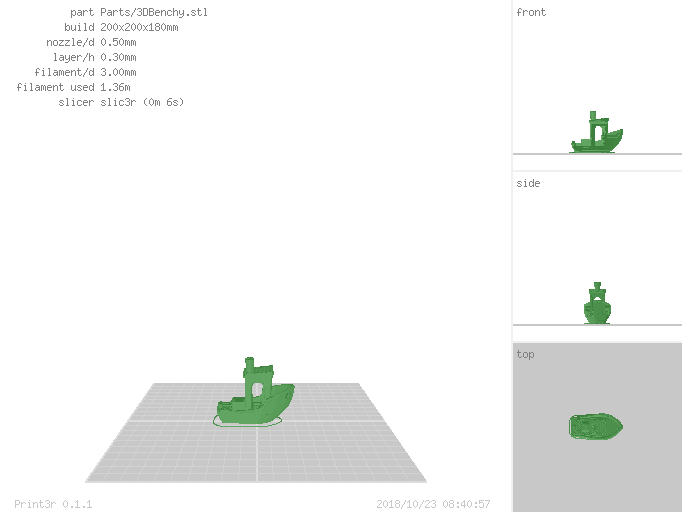
Instead to actually print parts, you can also let them render into .png image as well (e.g. for documentation purposes or preview):
```
print3r --output=benchy.png render 3DBenchy.stl
```
## See Also
- **[Print3r Wiki](https://github.com/Spiritdude/Print3r/wiki)**, detailed documentation
- [Spiritdude's Public Notebook: Print3r](https://spiritdude.wordpress.com/tag/print3r/)