Loading project Things
README.mdView source
⚠️ This project is archived. Last active development was in 2018. The code is preserved here for reference purposes only and is no longer maintained.
Overview
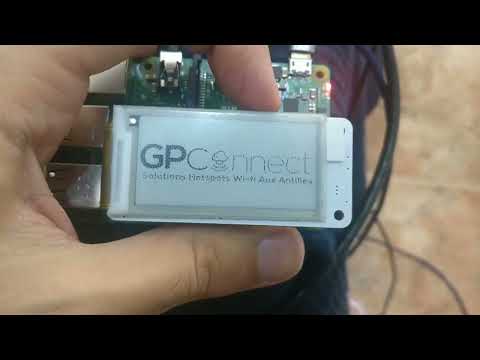
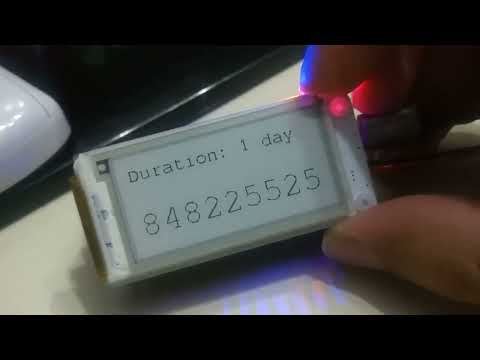
PiSpot Watch is a custom-built wearable IoT device designed for hotel and venue staff. Press a button on your wrist and instantly generate a time-limited Wi-Fi voucher code, displayed on a low-power e-ink screen. The device communicates with the Spotipo captive-portal API and retrieves per-device configuration securely from HashiCorp Vault.
Originally developed and deployed in 2018 for the company GPConnect, this project has been released as open-source. It is part of the PiSpot ecosystem:
| Project | Description |
|---|---|
| PiSpot Watch (this repo) | Wrist-wearable e-ink voucher device |
| PiSpot Show | HDMI kiosk display for lobby TVs |
| PiSpot Deployment | Fleet provisioning and Vault configuration |
Features
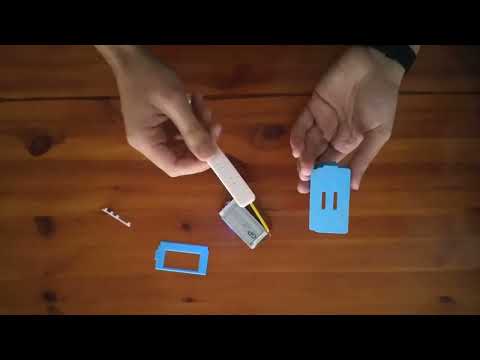
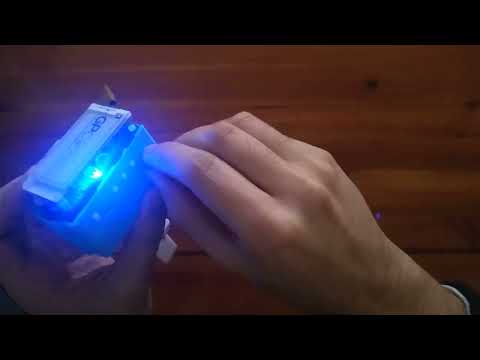
- Wearable form factor -- fully 3D-printed wristwatch case housing a Raspberry Pi Zero, PaPiRus e-ink HAT, and battery.
- One-press voucher generation -- each of the 4 configurable buttons creates a voucher with different duration presets via the Spotipo API.
- E-ink display -- 2.0" PaPiRus Zero electronic paper screen; always readable in sunlight, ultra-low power draw, holds image with no power.
- HashiCorp Vault integration -- per-device secrets (API keys, button mappings, speed limits) stored centrally and fetched at runtime via AppRole authentication.
- Low-battery shutdown -- JuiceBox battery monitor triggers graceful poweroff before the battery dies.
- Centralized logging -- FluentBit ships rotating logs to a remote aggregator.
- Ansible deployment -- single playbook provisions the entire device: drivers, services, Vault credentials, WiFi, power management.
- Power-optimized -- GPU memory reduced to 16 MB, HDMI disabled, ACT LED off, event-driven GPIO (no polling).
Videos
In Action
Assembly
Disassembly
Photos
See all photos in docs/photos/.
Hardware
| Component | Purpose |
|---|---|
| Raspberry Pi Zero | ARM processor, Wi-Fi connectivity |
| PaPiRus Zero (2.0") | E-ink display via SPI/I2C (V231_G2 panel) |
| JuiceBox battery | Wearable power supply with low-voltage shutdown |
| 5 tactile buttons | GPIO inputs: reboot (SW1) + 4 voucher presets (SW3-SW5 + optional SW2) |
| 3D-printed case | Custom enclosure with button cutouts and strap mounts |
How It Works
  Button press (GPIO interrupt)
         |
         v
  +------+------+
  | HashiCorp   |   Fetches device config:
  | Vault       |   API key, button mappings,
  | (AppRole)   |   speed limits, duration presets
  +------+------+
         |
         v
  +------+------+
  | Spotipo     |   POST /api/voucher/create/
  | WiFi API    |   --> returns voucher code
  +------+------+
         |
         v
  +------+------+
  | PaPiRus     |   Renders duration + code
  | e-ink       |   on 2.0" e-paper display
  | display     |   (holds for 30 seconds)
  +-------------+
- The device idles in a low-power loop, waiting for a GPIO falling-edge interrupt.
- On button press, it connects to Vault and retrieves the device's secret configuration by hostname.
- It POSTs to the Spotipo API with the voucher parameters mapped to the pressed button.
- The voucher code and duration are rendered on the e-ink display for 30 seconds, then the screen returns to the logo.
3D-Printable Case
The Case/ directory contains everything needed to print the wristwatch enclosure:
| File | Description |
|---|---|
Case.stl | Main watch body |
Buttons.stl | Physical button caps (set of 5) |
Cover.stl | Protective back cover |
PiSpot_Voucher.fcstd | FreeCAD parametric source (editable) |
*.gx | Goxel voxel models (case, buttons, cover, assembly views) |
Multiple case variants are included (3 Cases.gx, 7 Buttons.gx) for different button configurations.
Getting Started
1. Clone
git clone https://github.com/GeiserX/PiSpot-Watch.git
2. Set up Vault secrets
Use PiSpot Deployment to configure per-device secrets in Vault, or manually create a KV secret at pispot_voucher/<hostname> containing the Spotipo API key, button duration mappings, speed limits, and site number.
3. Deploy with Ansible
ansible-playbook -i inventory deployment-files/main.yml
The playbook handles:
- PaPiRus driver compilation (gratis V231_G2) and SPI/I2C enablement
- Python dependencies (
RPi.GPIO,requests,hvac) pispot.servicesystemd unit (auto-starts afterepd-fuse)- JuiceBox low-battery shutdown service
- FluentBit log aggregation
- Vault AppRole token bootstrap and weekly renewal cron job
- WiFi configuration and power optimizations
Project Structure
PiSpot-Watch/
  main.py                          # Main application (GPIO events + API calls + display)
  deployment-files/
    main.yml                       # Ansible provisioning playbook (288 lines)
    get-approle-token.py           # Unwraps Vault AppRole wrapped secret ID
    vault-renew-token-pi.py        # Weekly Vault token renewal (cron)
    pispot.service                 # Main app systemd unit
    low-battery-shutdown.service   # JuiceBox battery monitor unit
    papirus-clear.service          # Clears e-ink on shutdown
    td-agent-bit.conf              # FluentBit log shipping config
    wpa_supplicant.conf            # WiFi network config
  Case/                            # 3D enclosure (FreeCAD + Goxel + STL)
  docs/images/                     # Documentation assets
  extra/                           # Logo
  LICENSE                          # GPL-3.0
License
GNU General Public License v3.0
Maintainers
Contributing
Contributions are welcome. Open an issue or submit a pull request.
This project follows the Contributor Covenant v2.1 Code of Conduct.