Loading files
This file is pinned to the selected release. Download the original to open it in your design tool.
# Kalman
The software for AGH Space System's planetary rover

## Prerequisites
- All Python packages listed in the `requirements.txt` files in the directories of some Colcon packages.
- All APT packages listed in the `apt_packages.txt` files in the directories of some Colcon packages.
## Getting Started
To make development quicker, the launch process of the development setup has been split into two separate launch files. One of them, suffixed `_sim_base`, launches the simulation environment and RViz. The other one, suffixed `_sim_stack`, launches the rest of the software stack, including localization, mapping, and navigation capabilities:
```bash
ros2 launch kalman_bringup urc_sim_nav_base.launch.py
# Before running the next command, make sure that the simulation is started and sensor messages are being published.
ros2 launch kalman_bringup urc_sim_nav_stack.launch.py
```
> [!NOTE]
> The commands shown above will launch the Unity simulation environment which requires additional installation.
> Please follow the instructions [here](https://github.com/agh-space-systems-rover/unity_sim#Getting-Started) in order to set up Unity.
In order to run on a physical rover, just one launch file is needed:
```bash
ros2 launch kalman_bringup urc_pc_nav.launch.py
```
To launch the ground station, use the following command on a separate machine:
```bash
ros2 launch kalman_bringup urc_gs_nav.launch.py
```
For certain features to work, the ground station should be connected to the same network as the rover and/or have our custom radio communication hardware connected to it.
Multiple other launch files are available in the `kalman_bringup` package, including the ones for other competitions and development purposes.
## Packages
Kalman's software stack is composed of multiple packages that are meant to be built and run together:
- `kalman_arm` - configuration and launch files for the arm
- `kalman_arm_controller` - a set of nodes that use ROS2 Control and CAN to interface with joints and MoveIt controllers
- `kalman_arm_gs` - nodes for interfacing with the arm from the ground station
- `kalman_arm_moveit_config` - MoveIt configuration and launch files for the arm
- `kalman_arm_utils` - utility nodes for the arm
- `kalman_aruco` - ArUco tags detection using aruco_opencv
- `kalman_bringup` - launch files for the rover and the ground station
- `kalman_clouds` - point cloud generation and filtering
- `kalman_description` - Xacro / URDF descriptions + models for the rover
- `kalman_hardware` - drivers, tools and launch scripts for the physical hardware onboard; Only to be run separately from the simulation on a physical robot.
- `kalman_interfaces` - ROS 2 messages, services and actions used by the other `kalman_` packages
- `kalman_master` - drivers for our custom Master device
- `kalman_nav2` - configuration and launch files for Nav2 and related modules; Includes a custom path follower.
- `kalman_robot` - a metapackage that depends on all other `kalman_` packages
- `kalman_slam` - configuration files for robot_localization and RTAB-Map
- `kalman_supervisor` - Manages autonomous navigation missions.
- `kalman_wheels` - a node that converts Twist messages on `/cmd_vel` and similar topics to the actual wheel state; Also includes safeguards that can limit the acceleration and velocity or stop the rover to adjust wheel rotation.
- `kalman_yolo` - **PRIVATE** models and configs for `yolo_ros`
## Sub-projects
- `joy_linux` - joystick_srivers/joy_linux with our modifications and improvements
- `point_cloud_utils` - utilities for working with point clouds; Includes ROS wrappers around PCL filters and an obstacle detection node.
- `service_based_nav2_controller` - a `FollowPath` controller plugin for Nav2 that uses a service to compute velocity commands
- `unity_sim` - a Unity-based simulation environment that can seamlessly replace the physical hardware of AGH Space Systems' robots
- `yolo_ros` - YOLO-based object detector; Supports composition and lifecycle management.
## Launch Files
The `kalman_bringup` package contains main launch files that are meant to be the only ones used via `ros2 launch`. The whole stack is organized into self-contained `kalman_` modules. Each of them has a single launch file that can be run with arguments in order to use different runtime configurations. A module's ROS API may depend on the output of different modules, but those dependencies won't launch automatically. `kalman_bringup` is the way to manage different stack configurations, and it can include the needed modules if the `ros2 launch`-able main launch files request so. Here you can see how `kalman_bringup` is the root of the launch hierarchy, and how there's just a single level of nesting - Means that only `kalman_bringup` can include other modules:

## Data Flow
All `kalman_` modules are designed to work together and exchange data in a complex manner. The following diagram shows a high-level overview of the data flow between the modules:
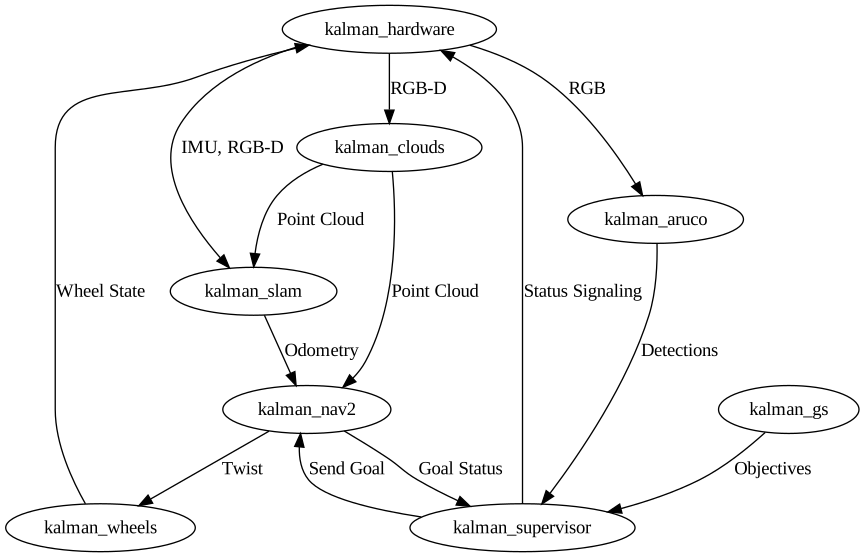
As mentioned in [Launch Hierarchy](#launch-hierarchy), top-level modules may include other modules that are not shown in the diagram. Each module contains a set of nodes that actually perform the data processing and exchange.
## SSH setup
In order to connect to the rover on-board computer via SSH perform following steps:
1. Set up static ip address on your PC to `192.168.1.1` (this IP address is configured as default gateway on the rover's computer) with subnet mask `255.255.255.0`
2. Test connection using ping command
```bash
ping 192.168.1.3
```
3. Connect to the rover using SSH
```bash
ssh kalman@192.168.1.3
```
Using password:
```
x
```
## Guidelines
- When committing new code, please follow the [Conventional Commits](https://www.conventionalcommits.org/en/v1.0.0/) specification.
- The `scripts` directory should only contain scripts that are meant to be installed as ROS executables.
- The `tools` directory should only contain developer utilities and not ROS-related code.
- Whenever possible, design your C++ nodes as components. See [this tutorial](https://docs.ros.org/en/iron/Tutorials/Intermediate/Writing-a-Composable-Node.html) for more information.
- If a dependency is not available in rosdep, please add it to the `apt_packages.txt` or `requirements.txt` file created next to `package.xml`. Always prefer rosdep over those files.
## Troubleshooting
### Out of Memory
`kalman_robot` builds some third-party C++ dependencies from source. By default Colcon allocates jobs without rescheduling them when memory usage approaches maximum. In turn your system may run out of memory while a build is running. To avoid this, create a swap file on your system:
```bash
sudo fallocate -l 16G /swapfile
sudo chmod 600 /swapfile
sudo mkswap /swapfile
sudo swapon /swapfile
```
After the build is done, you can remove the swap file:
```bash
sudo swapoff /swapfile
sudo rm /swapfile
```
Subsequent incremental builds should not need that much memory.
7e293118aThis file is pinned to the selected release. Download the original to open it in your design tool.