Loading files
This file is pinned to the selected release. Download the original to open it in your design tool.
# Creating a custom firmware.uf2 image for EuroPi
## Compiling the firmware on Windows
1. If not already installed, install [Docker](https://docs.docker.com/desktop/install/windows-install/)
1. If not already cloned, [create a local clone](https://docs.github.com/en/repositories/creating-and-managing-repositories/cloning-a-repository?tool=desktop) of the EuroPi repository
1. Run Docker
1. Click the windows file manager file path *inside* the root folder of your clone of the EuroPi repo (the folder named 'EuroPi', not any of the folders inside it)

1. Type 'cmd'
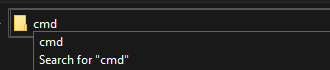
1. Press Enter
1. In the new terminal window, type 'software\uf2_build\build_uf2.bat'
1. Press Enter
1. Wait for .uf2 to compile (this may take some time, do not close the terminal window
1. The custom .uf2 build can be found at `EuroPi/software/uf2_build/europi-dev.uf2`
## Compiling the firmware on Mac/Linux
The instructions below describe the steps needed to build the uf2 locally on your machine for
development purposes. Alternatively you can run the script `software/uf2_build/build_uf2.sh` to
build the image in a docker container. You will need to have [docker](https://docs.docker.com/get-started/)
installed and running. See the script for execution details.
``` Bash
# install extra tools if not already done so
$ sudo apt update
$ sudo apt install cmake gcc-arm-none-eabi libnewlib-arm-none-eabi build-essential
# get micropython source from github repo
# choose latest stable version instead of the master branch
$ git clone -b v1.19.1 https://github.com/micropython/micropython.git
# fetch submodules
$ cd micropython
$ make -C ports/rp2 submodules
# build tools
$ make -C mpy-cross
# enter the dir for our hardware port
$ cd ports/rp2
$ ls
# files that should be frozen and included in the firmware should be placed in the 'modules' dir
# so thats 'micropython/ports/rp2/modules/'
# what should be done here is written below
# once that has been done you can continue to make the firmware
# optional clean up
$ make clean
# build the firmware
$ make
```
## Modules dir
after the files for EuroPi, EuroPi contrib and ssd1306 are inserted
the structure of the modules dir should look like this:
```
micropython/ports/rp2/modules/
├── _boot_fat.py
├── bootloader.py
├── _boot.py
├── calibrate.py
├── contrib
│ ├── bernoulli_gates.py
│ ├── coin_toss.py
│ ├── consequencer.py
│ ├── cvecorder.py
│ ├── diagnostic.py
│ ├── hamlet.py
│ └── ...
├── europi.py
├── europi_script.py
├── experimental
│ ├── __init__.py
│ └── knobs.py
├── main.py (optional)
├── rp2.py
├── setup.py
├── ssd1306.py
├── ui.py
└── version.py
```
_boot.py should be modified to look like this: (increase progsize)
``` Python
import os
import machine, rp2
bdev = rp2.Flash()
try:
vfs = os.VfsLfs2(bdev, progsize=1024)
except:
os.VfsLfs2.mkfs(bdev, progsize=1024)
vfs = os.VfsLfs2(bdev, progsize=1024)
os.mount(vfs, "/")
del os, bdev, vfs
```
main.py could look like this: (It's important to call the garbage collector to make space for the software)
``` Python
import gc
gc.collect()
from contrib.menu import *
BootloaderMenu(EUROPI_SCRIPTS).main()
```
## Import priority
When using import in micropython it will look for the file according to the priority defined by the position in sys.path.
So it will look at / and /lib first, before looking in the frozen firmware modules.
However if the frozen modules of the firmware include a main.py it will autostart this and ignore any main.py located in /.
## Freezing bytecode instead of source code
By default the files from the modules dir will be frozen (included in the firmware) as python source files (.py). Alternatively it is also possible to freeze the precompiled bytecode generated from these source files. Using precompiled bytecode instead of raw source code will reduce RAM usage might slightly improve execution performance. To freeze bytecode instead of source code manifest.py can be altered to look like this:
micropython/ports/rp2/boards/manifest.py
``` Python
freeze_as_mpy("$(PORT_DIR)/modules")
freeze("$(MPY_DIR)/drivers/onewire")
freeze("$(MPY_DIR)/drivers/dht", "dht.py")
include("$(MPY_DIR)/extmod/uasyncio/manifest.py")
include("$(MPY_DIR)/drivers/neopixel/manifest.py")
```
More details about the benefits of bytecode and documentation about manifest.py can be found here: https://docs.micropython.org/en/latest/reference/manifest.html
fb8a53c8dThis file is pinned to the selected release. Download the original to open it in your design tool.