Loading project Things
README.mdView source
DIY Aquarium Controller
Features
- The controller is based on ATMEL's microcontroller ATMEGA8A
- Settings are stored in EEPROM
- Detecting a system hang with Watchdog.
- Remote control via Bluetooth
- HC-05 module
- RFCOMM protocol
- Baud rate 9600 bps
- LED lighting
- 12V DC output
- 400mA max.
- Adjustable brightness
- Adjustable gradual turning on/off (0-30 min)
- Adjustable time of turning on/off the light
- Thermostat
- 220V AC output
- 3A max. (fused)
- Adjustable the min. and max. temperature thresholds
- Water temperature measurement
- DS18B20 sensor
- Accuracy 0.5 °C
- Error detecting
- On-board RTC
- DS1302 chip
- Adjustable date&time
- Adjustable daily time correction
- Backup battery
- 4-digits LED display
- Two modes of displaying: the current time or the temperature of the water
- Touch control
- Touch Sensor 1 to switch displaying mode (time -> temperature -> time -> ...)
- Touch Sensor 1 and Sensor 2 at the same time to switch the operation mode (on -> off -> auto -> on -> ...) of:
- the lighting if the display shows the time;
- the heater if the display shows the temperature;
- Aquarium-control app is designed to setup the aquarium settings (Windows, Linux, Android, Symbian)
Wiring diagram
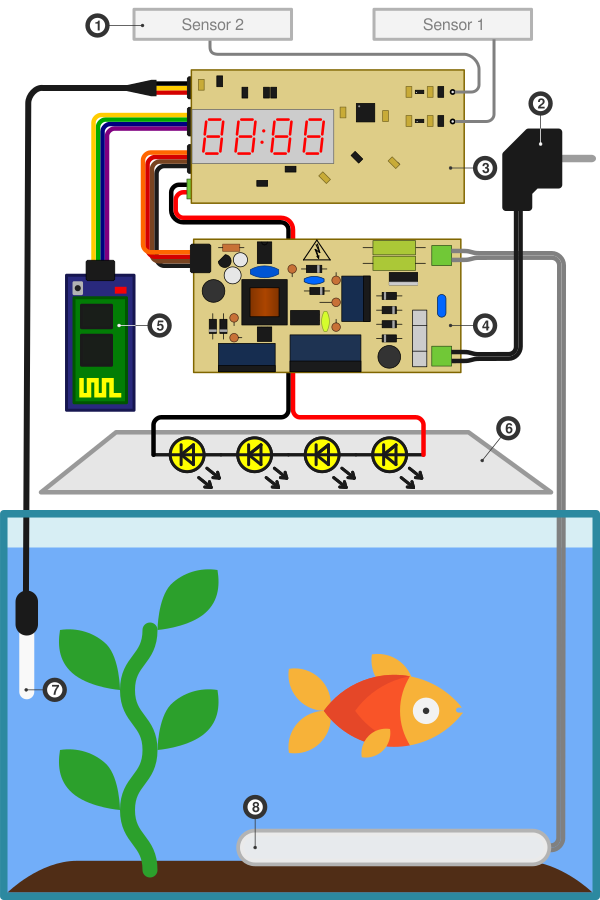
- Capacitive sensors (aluminum scotch 10x50mm on inner side of the top cover)
- Mains plug
- Aquarium controller PCB
- Power supply PCB
- Bluetooth module HC-05
- LEDs (4 x 1W = 12V 300mA)
- Waterproof DS18B20
- Heater
HC-05 configuration
- Change the indicating mode
- By default LED is blinking on idle and lighting on connecting
- Disconnect output LED2(31) from PCB's pad that is going to the LED and connect this pad to LED1(32) output
- Now LED is not lighting on idle and lighting on connecting
- Restore default settings
- Enter to AT-command mode
- Send command
AT+ORGL
- Set device name
- Enter to AT-command mode
- Send command
AT+NAME=aquarium(the device's name must begin with "aquarium" to be recognized by aquarium-control app)
- Reduce power consumption (from ~40mA to ~3mA on idle!)
- Enter to AT-command mode
- Send command
AT+IPSCAN=1024,1,1024,1
Communicating with the controller
After establishing a connection, you can send commands to the aquarium
controller to setup it.
If a command has the correct format and can be successfully completed the
controller will send OK response. If the command has the wrong format, the
controller will send ERROR response. If the controller receives an unknown
command it will send UNKNOWN response.
The command must end with \n or \r. If the value of a parameter is bigger
than allowed one it will be reduced to max. allowed value.
Command status
Get information about current state of the aquarium.
Format:
status
Response:
Date: 01.01.17 Friday
Time: 13:29:59 (-3 sec at 12:00:00)
Temp: 22
Heat: OFF auto (20-22)
Light: ON manual (10:00:00-20:00:00) 43/50% 10min
Display: time
Meaning:
Line 1: the current date and the day of the week; Line 2: the current time and the information about the daily time correction; Line 3: the temperature of the water (°C); Line 4: the thermostat status:
ON- the heater is on,OFF- the heater is offauto- automatic mode,manual- manual mode- the value in the parentheses indicates the temperature range that maintains in the automatic mode
Line 5: the lighting status:
ON- the light is on,OFF- the light is offauto- automatic mode,manual- manual mode- the value in the parentheses indicates the period of time when the light is on in the automatic mode
- at the end, the current/target brightness level in percent and the light rising time in minutes
Line 6: the display mode (time - the current time is shown, temp - the temperature of the water is shown)
Command date
Set a date.
Format:
date DD.MN.YY W
Parameters:
DD- day of the month (01-31)MN- month (01-12)YY- year (00-99)W- day of the week (1 - Monday ... 7 - Sunday)
Response:
OK or ERROR
Command time
Set a time and/or a time correction
Format 1:
time HH:MM:SS
Parameters:
HH- hours (00-23)MM- minutes (00-59)SS- seconds (00-59)
Format 2:
time +CC
time -CC
Parameters:
+or-- add or subtract the time correction valueCC- time correction in seconds (00-59)
Format 3:
time HH:MM:SS +CC
time HH:MM:SS -CC
Parameters:
HH- hours (00-23)MM- minutes (00-59)SS- seconds (00-59)+or-- add or subtract the time correction valueCC- time correction in seconds (00-59)
Response:
OK or ERROR
Command heat
Heater setup.
Format 1:
heat LO-HI
Parameters:
LO- minimal temperature (18-35)HI- maximal temperature (18-35)
Format 2:
heat on
heat off
heat auto
Parameters:
on- switch to the manual mode and turn on heateroff- switch to the manual mode and turn off heaterauto- switch to the automatic mode
Response:
OK or ERROR
Command light
Lighting setup.
Format 1:
light H1:M1:S1-H2:M2:S2
Parameters:
H1:M1:S1- light on time (00:00:00-23:59:59)H2:M2:S2- light off time (00:00:00-23:59:59)
Format 2:
light on
light off
light auto
Parameters:
on- switch to the manual mode and turn on lightoff- switch to the manual mode and turn off lightauto- switch to the automatic mode
Format 3:
light level LLL
Parameters:
LLL- brightness level in percent (000-100)
Format: 4:
light rise RR
Parameters:
RR- time of the light rising in minutes (00-30)
Format: 5:
light H1:M1:S1-H2:M2:S2 LLL RR
Parameters:
H1:M1:S1- time of turn on light (00:00:00-23:59:59)H2:M2:S2- time of turn off light (00:00:00-23:59:59)LLL- brightness level (000-100)RR- light rising time (00-30)
Response:
OK or ERROR
Command display
Display setup.
Format:
display time
display temp
Parameters:
time- show the current timetemp- show the current temperature of the water
Response:
OK or ERROR
Command reboot
Restart the program.
Format:
reboot
Response:
OK
Command help
Print the list of available commands.
Format:
help
Response:
Available commands:

status
date DD.MN.YY W
time HH:MM:SS
time +CC
time -CC
time HH:MM:SS +CC
time HH:MM:SS -CC
heat LO-HI
heat on
heat off
heat auto
light H1:M1:S1-H2:M2:S2
light level LLL
light rise RR
light H1:M1:S1-H2:M2:S2 LLL RR
light on
light off
light auto
display time
display temp
reboot
help